Why Everyone is Buying the Macbook Pro 16 2019 (Full Review)
Introduction
I've been using the Macbook Pro 16 2019 as my daily machine for several months now, and I wanted to write a full, honest account of why so many people either upgraded to it when it launched or are still choosing it today. I bought this laptop because I needed a workhorse for development, photo and video editing, and general multitasking. What I found was a machine that solved several real frustrations I had with earlier MacBook models, but it also introduced a few annoyances of its own.
First impressions and daily use
Out of the box the 16" feels premium and solid. The larger display is immediately noticeable: it's spacious in a way that makes multitasking feel natural. In my experience, having that extra screen real estate means fewer full-screen app flips and less reliance on external monitors during short work sessions. The keyboard felt like a relief after years of using the butterfly keyboard — the key travel and feedback are real improvements I noticed within the first hour of typing.
I've used this machine for coding sessions that sometimes run for hours, for exporting video timelines in Premiere, and for running virtual machines when I need to test server configurations. The fans ramp up during sustained heavy loads (as you'd expect), but for typical day-to-day use—email, browser tabs, Slack, light editing—it stays quiet and cool enough to use on my lap.
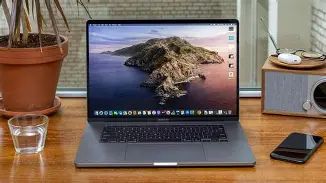
Performance: what it's like in real tasks
My unit is equipped with the higher-end 8-core Intel chip and a dedicated Radeon GPU. What that combination means in practice is snappy, predictable performance for single-threaded and multi-threaded tasks. I noticed big improvements over my older 2015/2017 MBP when compiling large codebases—build times dropped noticeably. When exporting 4K timelines, the GPU acceleration and thermal headroom helped keep export times reasonable.
That said, there's nuance. During very long, sustained CPU-plus-GPU workloads (think: big exports while running background processes and heavy compilation), the machine can run hot and the CPU may throttle. I saw this during a marathon render session where the fans were loud for a prolonged period and the case got warm near the hinge. For most people that won't be a daily issue, but if your workflow is many hours of maxed-out CPU and GPU, cooling limits matter and I felt them.
Display, speakers, and webcam
The 16" Retina display is one of the biggest practical upgrades. Colors are vivid, contrast is deep, and the extra pixels make a real difference when working with timelines or large spreadsheets. I appreciated how little I had to scale the UI—the default scaling gives you a usable desktop space without shrinking text into unreadability.
Apple significantly stepped up the speaker system in this model. I've used it to preview mixes and watch shows without headphones, and the soundstage is fuller and louder than many laptops. The bass is much more present than previous MacBook Pros I've owned. The microphone array is also noticeably better—recording quick voice notes or podcasts yielded clean, intelligible audio without the muddiness I remember from older models.
The webcam is adequate for video calls, but it's still not a massive improvement over prior MacBook cameras. If you attend professional shoots or need a truly crisp webcam for streaming, you'll still benefit from an external camera.
Find top-rated Laptops & Computers products at great prices.
View Offers →Keyboard and input
One of the reasons I bought the 16" was the keyboard. The new scissor-switch mechanism feels more reliable and comfortable than the butterfly keyboard I used to dread. I noticed fewer missed keypresses and a more confident typing cadence. The physical Escape key and the inverted-T arrow keys are small details that made the everyday experience feel less fiddly.
The Touch Bar remains a divisive feature. I found it useful in certain apps (clip scrubbing in timelines, quick formatting in some editors), but I still rely on keyboard shortcuts far more than on Touch Bar controls. Touch ID is handy for logins and quick password fills, and I appreciate how it works seamlessly with macOS.
Battery life and mobility
Battery life varies with workload. For light web browsing, email, and text editing, I routinely get a full workday (6–8 hours) on a charge. For heavier usage—video editing, running VMs, or long compilation runs—battery life drops significantly and you want to be plugged in. The 16" battery is larger than smaller MacBooks, and in my daily commute usage it has been reliable for typical office tasks.
Weight is a trade-off: the 16" isn't the lightest laptop. I noticed it in my shoulder bag compared to a 13" machine. If you travel constantly and prioritize a featherweight device, this may not be ideal. But if you want a desktop replacement with a large display and real power, the mobility trade-offs are fair in my view.
Ports and expandability
Like recent MacBook Pros of that era, the 16" includes four Thunderbolt 3 (USB-C) ports and a headphone jack. I liked having four TB3 ports because I didn't have to shuffle peripherals as much; two on each side is convenient. That said, you will still need adapters for HDMI, full-size SD card readers, or USB-A devices—so keep a small dock or dongle kit handy if you rely on older accessories.
Internally the machine is less user-serviceable than traditional laptops—RAM and storage are soldered/paired at the factory in many configurations—so choose your RAM and storage carefully at purchase if you anticipate heavy future needs. During my months of use I appreciated having extra RAM and a roomy SSD because it meant fewer hiccups when multitasking with large files.
Build quality, thermals, and noise
The aluminum chassis feels robust and premium. After months of daily use, scuffs and micro-scratches are minimal if you take normal care. The hinge is stiff and keeps the display stable—even on a lap when typing aggressively.
Thermals are the area where my experience is mixed. For average workloads it's fine; fans are quiet or idle. For extended heavy loads, fans come on loud and the machine does get warm at the keyboard and bottom. I sometimes moved to a desk fan when rendering long projects to keep ambient temperature down. I wouldn't call the thermals a deal-breaker, but it's something to plan around if you do sustained heavy compute work regularly.
Find top-rated Laptops & Computers products at great prices.
View Offers →Software and ecosystem
macOS on this machine felt mature and smooth during the months I used it. I appreciated continuity features (phone call handoff, iMessage, etc.) that integrate with my phone. Software compatibility was excellent for most creative and development tools. That said, Apple Silicon arrived shortly after this laptop's release and alternative machines with Apple chips changed performance-per-watt expectations. Still, for those who need the combination of specific Intel-native apps and a powerful discrete GPU, the 16" remains a very solid choice.
Pros & Cons
- Pros
- Large, color-accurate 16" Retina display that makes multitasking and media work much easier for me.
- Comfortable, reliable keyboard — a big improvement over the butterfly keys.
- Excellent speaker and microphone quality for casual audio work and conferencing.
- High-performance CPU/GPU configurations that handle compilation and video export well.
- Four Thunderbolt 3 ports give flexibility for docks and peripherals.
- Cons
- Heavier and less portable than 13" machines — I noticed the weight on longer commutes.
- Can get hot and noisy under sustained heavy loads; thermal throttling is possible.
- Still depends on adapters for many common ports (HDMI, SD, USB-A).
- Price is high for top configurations; you need to choose specs wisely at purchase.
- Not Apple Silicon—so battery efficiency and certain performance-per-watt advantages are behind newer M1/M2 Macs.
Comparison: 15" (2018) vs 16" (2019) vs 13" M1 (2020)
| Model | Typical CPU | GPU | Max RAM | Display | Battery & Mobility | Best for |
|---|---|---|---|---|---|---|
| MacBook Pro 15" (2018) | Up to 6-core Intel | Discrete Radeon options (previous gen) | Up to 32GB | 15" Retina (smaller than 16") | Good, lighter than 16", but older keyboard | Users wanting older form factor or lower cost used machines |
| MacBook Pro 16" (2019) | Up to 8-core Intel | Radeon Pro 5300M/5500M | Up to 64GB (configurable) | 16" Retina — more desktop-like workspace | Large battery, heavier but still portable | Power users who need large screen and discrete GPU |
| MacBook Pro 13" (M1, 2020) | Apple M1 (high efficiency) | Integrated Apple GPU | Up to 16GB | 13" Retina — smaller but very efficient | Excellent battery life, very lightweight | Users prioritizing battery life and portability |
Buying guide: who should buy the Macbook Pro 16 2019 and how to configure it
After several months with this laptop, here are practical suggestions based on my experience.
Who should consider the 16"?
- If you do video editing, color grading, or creative work that benefits from a larger display and discrete GPU, this is a natural fit.
- If you compile large codebases, run VMs, or work in software that scales across many CPU threads, the 8-core options make a real difference.
- If you want a desktop-replacement laptop with great speakers and a full keyboard, and you can accept a bit more weight in exchange for those benefits.
Who might look elsewhere?
- If you prioritize maximum battery life and the lightest possible laptop, newer Apple Silicon machines or lighter ultrabooks are worth considering.
- If you need a very budget-friendly machine, the 16" is expensive at higher configurations.
- If your workload is purely single-threaded or web-based, you may not benefit enough from the discrete GPU and higher-core CPUs to justify the cost.
Configuration tips
- RAM: I recommend at least 16GB for general use. If you run VMs, large photo libraries, or serious editing projects, 32GB or 64GB pays off. I noticed a smoother experience with 32GB when juggling apps and large files.
- CPU: The 8-core i9 is great for heavy workloads, but if your work is mostly light-to-moderate, a 6-core i7 provides excellent value and less heat/noise for the same everyday tasks.
- GPU: If you do GPU-accelerated video work or 3D tasks, opt for the stronger Radeon option. For code, web, or writing, the base discrete GPU is usually sufficient.
- Storage: SSD space fills faster than you expect with media projects. I recommend sizing up if you regularly handle large files; external fast SSDs are an alternative if budget is a concern.
- Accessories: Factor a small USB-C dock or a few adapters into your purchase if you rely on SD cards, HDMI, or USB-A peripherals.
Used vs new
I considered a refurbished unit before buying. If buying used, check the keyboard and ensure there are no signs of thermal damage or swelling (rare but possible). Verify battery health and ask about any heavy sustained-usage history if the seller knows. A factory-configured RAM/SSD choice is difficult to change later, so confirm specs carefully.
Real annoyances and caveats I experienced
Being honest about what bothered me: the weight and heat under heavy loads were the two most repeated annoyances. There were moments when I wished the fans were quieter during long rendering sessions. Also, having to carry adapters for common things like SD cards and HDMI was a persistent minor frustration—small, but real. Finally, if you need the very latest per-watt performance benefits, the Apple Silicon line did change the landscape shortly after this model's era.
Conclusion
After using the Macbook Pro 16 2019 for months, my take is that it's a purposeful machine aimed at creatives and power users who want a large, color-accurate display, better keyboard comfort, and significant CPU/GPU performance in a portable package. I appreciated the improved keyboard, the speakers, and the clear day-to-day productivity gains from the larger screen and extra cores. For anyone whose work is limited by screen size, thermal headroom, or GPU muscle, the 16" is a compelling choice.
That said, it's not perfect: it's heavier than ultra-portables, can run loud and warm under sustained stress, and requires thought at purchase because upgrades are limited later. If you value raw portability and battery efficiency above all else, consider other options; but if you want a reliable, powerful laptop that feels like a significant step up from earlier MacBook Pros, the 16" 2019 remains, in my experience, one of the most sensible choices.